
Room Readiness Review
Measure and document the conditions that affect meeting quality, including room acoustics, background noise, room controls, conferencing, BYOD and start-up performance.

Regional AV Support • Helpdesk • Room Readiness
One support channel for your meeting rooms—backed by a specialist AV helpdesk, structured ticketing, remote diagnostics, onsite engineers, preventive maintenance and measurable Room Readiness Reviews across multiple locations.
AV support, measured
Our support model combines AV expertise with disciplined service operations. Customers have one place to call, every issue becomes a tracked ticket, remote resolution is attempted first, and an engineer is dispatched when the issue cannot be solved remotely.
Measure and document the conditions that affect meeting quality, including room acoustics, background noise, room controls, conferencing, BYOD and start-up performance.
Scheduled health checks, diagnostics, configuration reviews, cleaning, testing and software or firmware updates to reduce avoidable failures.
A clear point of contact to log, prioritise and track service requests while coordinating between users, local teams and technical specialists.
Hands-on troubleshooting, corrective work and room-by-room support under the agreed coverage and response arrangements.
One channel across multiple cities
For organisations operating across multiple offices, the goal is simple: users should not need to work out who to call. Requests enter through one agreed support channel and are managed through a consistent helpdesk and ticketing process.
User calls or raises a request through the agreed service channel.
Helpdesk confirms impact, priority, room, system and symptoms.
Issue is logged, tracked and escalated against the agreed service level.
AV specialists diagnose, guide the user and resolve remotely where possible.
If remote resolution is not possible, the right engineer is coordinated to site.
Resolution, actions and recurring issues are captured for follow-up and review.
Service levels
Not every workplace needs the same coverage. Service levels can be structured around business criticality, operating hours, location and the response commitment required.
24-hour coverage, seven days a week, with a four-hour response / onsite commitment structure where agreed.
Business-hours coverage with a four-hour response / onsite commitment structure for supported locations.
Business-hours coverage with next-business-day onsite support where remote resolution is not sufficient.
Coverage windows, response definitions, onsite obligations, parts availability and escalation terms are agreed contractually for each customer and location.
Sample deliverable
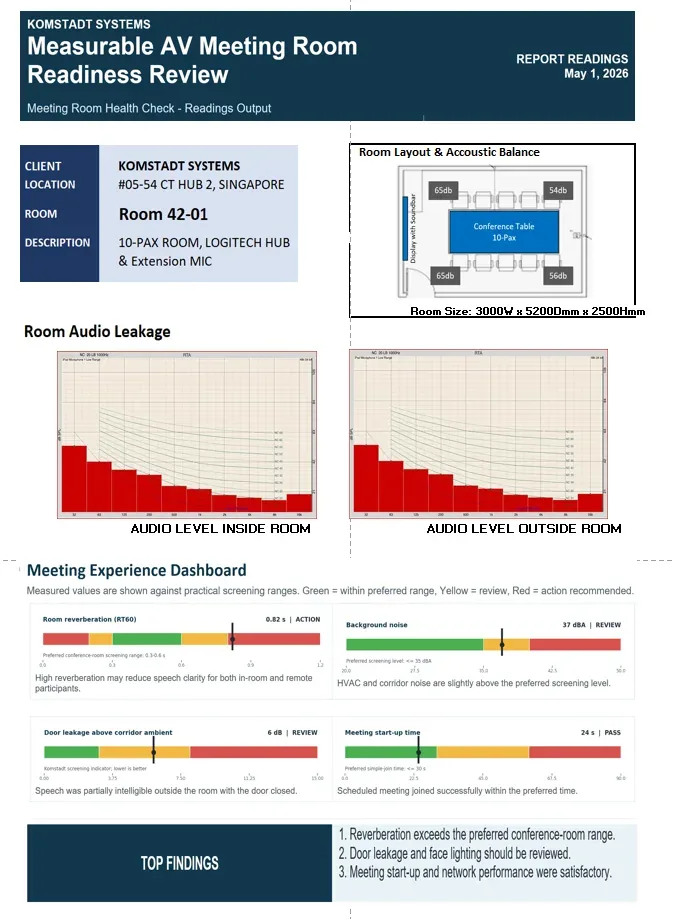
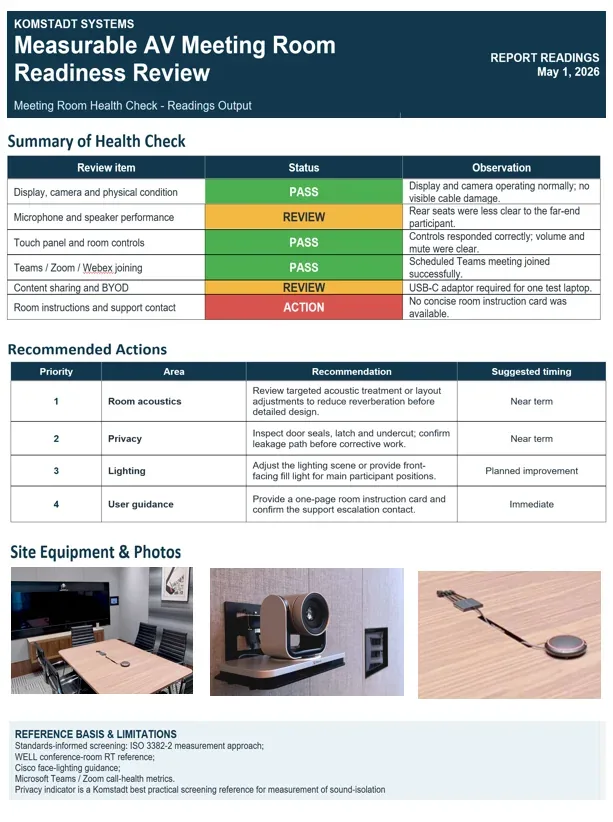
A room can appear operational and still create a poor meeting experience. Our Room Readiness Review provides a structured, measurable baseline of room performance and the actions required to keep the room ready.
The sample is intentionally shown as a small preview. The deliverable can include acoustic and noise screening, AV / UC / controls checks, BYOD, room start-up performance, equipment condition, findings and prioritised recommended actions.
The result is a practical PASS / REVIEW / ACTION view that gives facilities and IT teams a clearer baseline for ongoing maintenance.
Structured maintenance takeover
Many maintenance engagements begin as a takeover from an existing support arrangement. We establish a clean baseline, identify open issues and put a structured operating model in place so the transition is controlled rather than disruptive.
Confirm supported sites, meeting rooms, platforms, equipment, configurations and known dependencies.
Review recurring faults, unresolved tickets, user pain points, documentation gaps and known risks.
Set the helpdesk channel, priorities, contacts, service hours, response terms and onsite dispatch rules.
Track tickets, preventive maintenance, Room Readiness findings and repeat issues so service quality can improve over time.
Questions, answered
The review can be tailored to the room and agreed scope. Typical checks include room acoustics and noise conditions, microphone and speaker performance, display and camera condition, room controls, conferencing-platform joining, content sharing / BYOD, start-up performance and user guidance. Findings can be summarised as PASS, REVIEW or ACTION with recommended next steps.
Support can be structured around different operating needs, including 24×7×4, 8×5×4 and business-hours / next-business-day models. The exact coverage, response definitions, onsite commitments and exclusions are agreed in the service contract for each customer and location.
Customers can use one agreed support channel. The helpdesk triages the request, raises and tracks the ticket, attempts remote resolution and coordinates local engineer dispatch when onsite support is required. This gives multiple cities a consistent operating process while still using local delivery resources.
Yes. A takeover can begin with a room and asset baseline, open-issue review, support-process handover and Room Readiness checks. From there, service levels, escalation routes, preventive maintenance and reporting can be established under a clearer support structure.
Planning guide
A useful AV maintenance approach combines preventive checks, accessible support processes and clear responsibilities when a meeting space develops a fault.
Depending on the service agreement, checks can cover conferencing devices, displays, microphones, software status, connections and system operation before important meetings are disrupted.
Onsite support is valuable when an issue requires physical diagnosis, equipment changes or hands-on assistance beyond remote helpdesk troubleshooting.
Share the room or device name, symptoms, time the issue began, any error messages and recent changes. A current equipment list and clear escalation path can make diagnosis more efficient.